
A website maintenance checklist comes down to five jobs: find out within minutes when the site is down, keep a backup you have restored at least once, track everything that expires, check every page before a change goes live, and review the legal and contact pages once a year. At Elroot Labs we run each of these on our own site, elrootlabs.com, and two of the schedules we set did not keep time. This is the schedule as it runs, with what each job has proved so far.
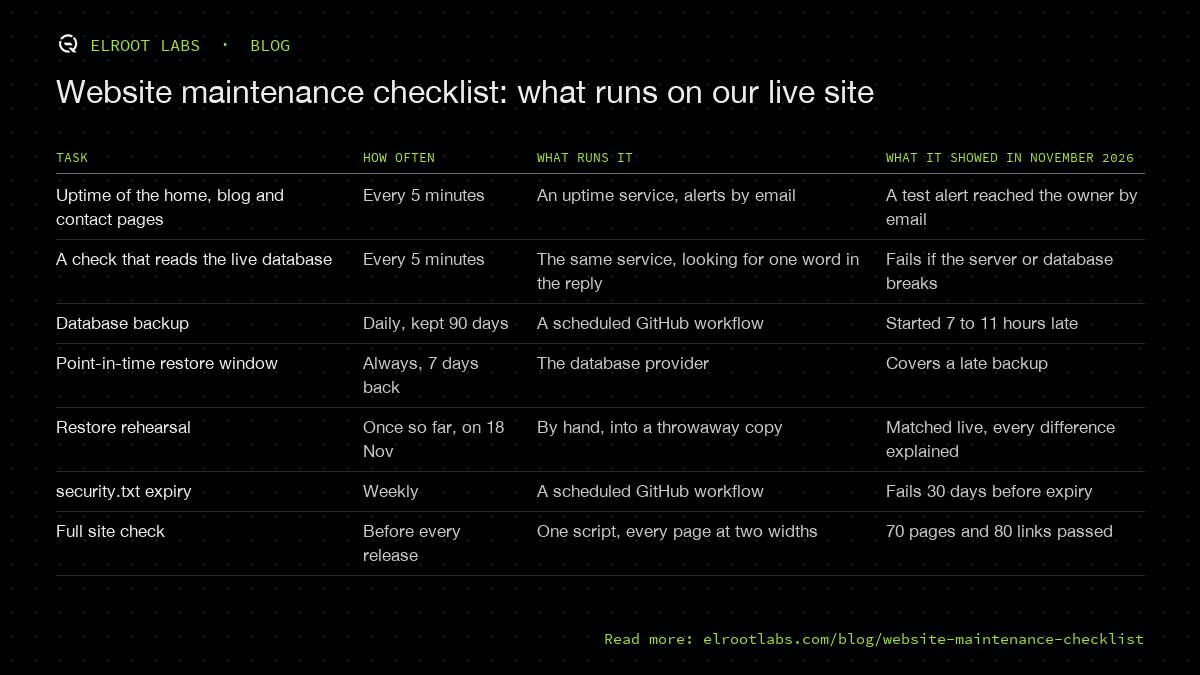
| Task | How often | What runs it | What it showed in November 2026 |
|---|---|---|---|
| Uptime of the home, blog and contact pages | Every 5 minutes | An uptime service, alerts by email | A test alert reached the owner by email |
| A check that reads the live database | Every 5 minutes | The same service, looking for one word in the reply | Fails if the server or database breaks |
| Database backup | Daily, kept 90 days | A scheduled GitHub workflow | Started 7 to 11 hours late |
| Point-in-time restore window | Always, 7 days back | The database provider | Covers a late backup |
| Restore rehearsal | Once so far, on 18 Nov | By hand, into a throwaway copy | Matched live, every difference explained |
| security.txt expiry | Weekly | A scheduled GitHub workflow | Fails 30 days before expiry |
| Full site check | Before every release | One script, every page at two widths | 70 pages and 80 links passed |
Check uptime every 5 minutes, and make one check touch the database
An uptime monitor that loads your home page tells you the web server answers. It says nothing about the database behind your contact form, and that is usually the part that breaks quietly. Our monitor runs four checks every 5 minutes: three pages, and one request to an endpoint that reads the live database and returns a known word. If that word is missing, the alert fires, even when every page still loads.
We did not probe the enquiry form itself. Reading it returns an error by design, and submitting it every 5 minutes would file a fake enquiry each time. The database check uses the same server and database connection the form uses, which covers most of what can go wrong.
We started with a scheduled GitHub workflow set to run every 30 minutes. It ran every 5 to 9 hours instead: at 21:57 UTC on 17 November, then 03:16 and 11:58 UTC on 18 November. GitHub's documentation is open about this: scheduled runs can be delayed during high load, especially at the start of every hour, and some can be dropped. A job that might run eight hours late is a backup check, not an alarm, so the alarm moved to a dedicated uptime service on its free plan and the workflow stayed as a second line.
A backup counts once you have restored it
Our database is exported every day and kept for 90 days as a private file in GitHub. The job is set for 06:07 India time, away from the top of the hour. It still started 10.6, 7.8 and 7.3 hours late on 16, 17 and 18 November. A late backup is fine as long as something else covers the gap: our database provider keeps a 7-day window we can restore to any point in, so a missed night costs nothing.
The part most checklists say and few people do is the restore. On 18 November we took the previous day's backup, a 2,437-byte export, and loaded it into a throwaway copy of the database. It loaded without errors, the integrity check passed, and all five tables matched the structure in our code. Then we compared row counts with the live database. Every difference was a row created after the backup started: one job application and two entries on our community wall. That comparison is the proof. "The file exists" proves only that a job ran.
We deleted the local copy straight after, because it held a job applicant's details. One step is still open: we have rehearsed reading a backup, not restoring it into the live database itself. That is the next rehearsal.
Put an expiry date on anything that expires
Several things on a small site expire: the domain, the certificate, the payment card on the hosting account. Ours has one more, the security.txt file that tells researchers how to report a security problem. The standard behind it makes the expiry field mandatory and recommends setting it less than a year ahead, which means the file goes stale every year by design.
So we gave it a check. A workflow runs every Monday, reads the live file, and fails, which sends an email, from 30 days before the date. Ours currently expires on 16 November 2027. The same pattern works for anything with a renewal date: write the date down where a script can read it, and have the script complain a month early.
Check every page before a change goes live
Every change to our site goes to a staging copy first. Before it is published, one script loads every page in the sitemap at a desktop and a phone width, checks every image has suitable alt text, follows every link, clicks through eight common paths without submitting anything, and confirms the blog lists every post. On 18 November it passed 70 pages and 80 links on the live site.
A script like this replaces the "click around after the update" step that maintenance lists ask for, and it runs the same way every time. It also catches problems an update causes on pages nobody thought to look at. Our website security checklist covers what to check on the security side, and our speed work shows how we measure pages on a phone.
What should a website maintenance checklist include?
By how often each task needs doing:
- Every few minutes: an uptime check on your main pages, plus one check that proves the database or booking system answers.
- Daily: a backup, stored somewhere other than the server it protects, kept for at least a few weeks.
- Weekly: a script that checks every expiry date you depend on, and fails a month before each one.
- Before every change: a staging copy, and a check of every page, link and key path on it.
- Monthly: apply software updates, read the uptime report, test the contact or booking form by hand, and look for broken links.
- Quarterly: restore a backup into a throwaway copy and compare it with live, row by row.
- Yearly: review the privacy policy, terms and contact details, and renew anything that runs on an annual cycle.
The monthly form test is the one we do by hand, because automating it means sending fake enquiries. Everything else on this list runs without anyone remembering it.
If you would rather hand this list to someone who runs it for you, our monthly retainer, a set amount of engineering time each month, covers this kind of ongoing work. Tell us about your site.