
You can run an LLM fully offline by shipping a small, compressed model with your app and running it through an on-device runtime that uses the device's NPU, GPU or CPU. It is worth doing when data must stay on the device, when the connection cannot be relied on, or when per-token cloud costs add up. It is a poor fit when the task needs the breadth of knowledge or reasoning that only a large hosted model has. Five decisions settle whether it works for your app: whether the model fits in memory, how much quality compression costs, how the model reaches the device, how you update it, and what happens when the device or the model cannot do the job.
Offline inference earns its place in three situations
Microsoft's documentation for Foundry Local, its on-device runtime, lists the reasons to run a model locally: keeping sensitive data on the device, working in limited-connectivity or offline environments, cutting per-token inference costs, and answering with low latency. Those map onto three kinds of product.
- Software used where the network drops: a school in a district with patchy broadband, a clinic during a power cut, a field team between towers. We have written about why offline behaviour belongs in the data model rather than an error screen, and an on-device model is the AI version of the same decision.
- Data that should not leave the device, such as health notes, student records, or voice recordings.
- High-volume, narrow tasks where a hosted model's per-call cost is hard to justify: summarising a form, classifying a ticket, cleaning up dictated text.
The same documentation is clear about the limit. Foundry Local is built for one user on one device, and for serving many concurrent users Microsoft points to server runtimes such as vLLM instead. If your plan is one model shared by a whole office, that is a self-hosted or sovereign deployment, a different problem.
Memory decides which model you can ship
A model's weights have to be readable fast enough to generate text, which in practice means they have to fit in the device's working memory. That is the constraint behind most on-device research. One paper showed a way to run models up to twice the size of available DRAM by keeping parameters in flash storage and loading only what each step needs, with inference 4 to 5 times faster on CPU and 20 to 25 times faster on GPU than naive loading (Alizadeh et al., LLM in a flash). Even with that technique, the device's memory still sets the largest model you can run.
So choose the model by the weakest device you intend to support, not by the laptop it was tested on. Microsoft's guidance for its Phi Silica model on Windows says to benchmark on representative hardware, including lower-end configurations, because performance varies widely across GPUs.
Small models are a reasonable starting point for narrow tasks. The MobileLLM study found that below a billion parameters, architecture choices matter more than data and parameter count, and reported accuracy gains of 2.7% and 4.3% over the previous best 125M and 350M models (Liu et al., 2024). Give a model that size a fixed task you have tested it on, and leave open questions about the world to a larger hosted model.
We did the arithmetic on the laptop this post was written on
Spec sheets say how much memory a device has. What matters is how much is free while your users are doing everything else. So we checked on the machine this post was written on: an Apple M4 Mac with 16 GB of memory, with a browser, a virtual machine and a desktop AI app open, which is an ordinary working day. macOS reported about 3.1 GB free or immediately reusable, and another 6.8 GB already squeezed by the memory compressor. A 16 GB machine had roughly 3 GB to give.
A model's weights take its parameter count multiplied by the bits per weight, divided by eight:
| Model size | 16-bit | 8-bit | 4-bit |
|---|---|---|---|
| 1 billion parameters | 2 GB | 1 GB | 0.5 GB |
| 3 billion parameters | 6 GB | 3 GB | 1.5 GB |
| 8 billion parameters | 16 GB | 8 GB | 4 GB |
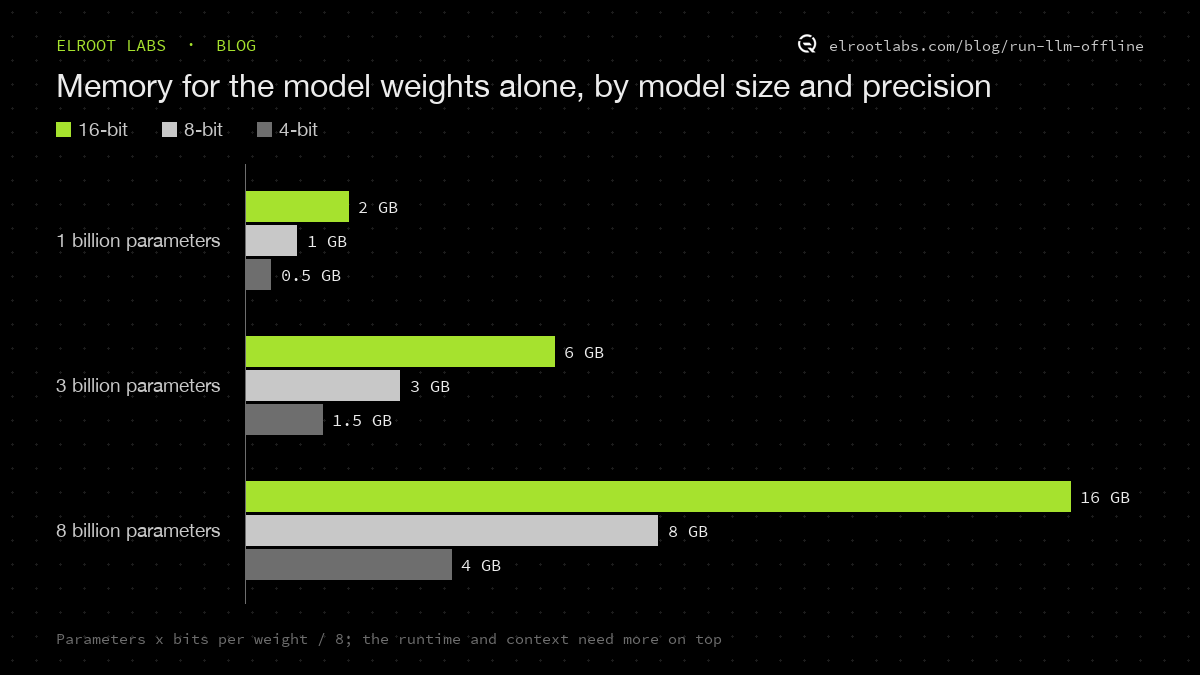
Those figures are for the weights alone. The runtime, the app and the model's working memory for the conversation (which grows with longer inputs) come on top.
Read against our 3 GB, the table makes the decision for you. A 3-billion-parameter model at 4 bits fits with room to spare. The same model at 16 bits does not come close. An 8-billion-parameter model at 4 bits would push the machine into heavy compression and swapping, which a user experiences as everything slowing down at once. If a recent 16 GB laptop has about 3 GB to spare, a mid-range phone or a school's older desktop has less. Measure free memory on the devices your users actually have, during a normal day, before choosing a model.
Compression shrinks the model and costs some accuracy
Quantisation stores weights in fewer bits so the model takes less memory and runs faster. The AWQ method keeps the most important 1% of weights protected while quantising the rest to 4 bits, and its runtime reports more than a 3x speedup over a standard 16-bit implementation on both desktop and mobile GPUs (Lin et al., AWQ). Foundry Local states that every model in its catalogue goes through quantisation and compression before it is offered for on-device use.
The practical rule is to evaluate the model you will ship. Run your evaluation set on the quantised model on target hardware, not on the full-precision version in the cloud. The failures that appear only after compression are the ones your users will see.
Plan the first download, because offline starts with a network
An offline model still has to arrive on the device once. Foundry Local downloads models automatically on first use and caches them, and its runtime adds about 20 MB to the app package. Microsoft's Phi Silica documentation is more explicit about the size problem: on GPU devices the model is not pre-installed, it downloads on demand, the download is several gigabytes, and Microsoft recommends showing a consent dialog before starting it.
For software that will be used in the field, schedule that download for setup, on a good connection, and check that it finished. A model that starts downloading on the first morning in a rural clinic is an online feature with extra steps.
Treat a model update as a release
On-device models change underneath you. The Phi Silica page now carries a notice that Phi Silica is being replaced by a new on-device model, Aion Instruct, rolling out to Windows Insider devices in November 2026 and to retail devices in January 2027, when Phi Silica is removed. Developers who trained LoRA adapters for Phi Silica are told to retrain them.
If your app depends on a model the operating system provides, put that transition on your calendar and rerun your tests against the new model before your users get it. If you ship your own model, pin the version. Foundry Local versions its models so an app can pin a specific version or take updates automatically; for anything that affects records or decisions, pin, test, then move.
Always ship a fallback
Some devices will not run the model, and the model will not answer some questions well. Microsoft's guidance covers both: when the hardware is not supported, offer a fallback experience, and where response time matters, add timeouts and consider a cloud fallback, with the user's consent.
Three fallbacks cover most apps:
- Send the request to a hosted model when the device is online and the user has agreed to it.
- Queue the request and answer it after the next sync, with the pending state visible.
- Keep a path that needs no model at all, such as a form, a search or a template.
The fallback is also where privacy promises get tested. If the reason for going offline was keeping data on the device, the cloud fallback needs the same consent and the same data limits, or it quietly undoes the decision.
Check these five things before you commit
- Memory: does the model, quantised, fit and respond acceptably on the weakest device you support?
- Accuracy: does the quantised model pass your evaluation set on that hardware?
- First download: when and over which connection does the model reach the device, and how do you know it finished?
- Updates: who decides when the model version changes, and what gets retested?
- Fallback: what does the user see when the device cannot run the model or the model cannot answer?
If any answer is unknown, run that test before building the feature. The same constraint shapes DeskBuddy, a device we built to keep working without depending on the cloud.