
A remote MCP server can run without a login when every tool it offers is read-only and the data behind it is already public. It still has to refuse a lot: browsers on other sites, oversized bodies, batches, headers that disagree with the body, unknown tools and floods. Elroot Labs has run one at elrootlabs.com/mcp since 18 November 2026, and this post lists each guard on it with the test that proves the guard works.
The server belongs to Elroot Dot Matrix, our library of dot-matrix animations. Any AI coding tool can connect to it and ask for an animation as React, HTML or SVG code. It has three tools, list_categories, search_arts and get_art, and all three are marked read-only. It keeps no session, uses no database and holds no secret.
When can a remote MCP server skip the login?
The MCP specification says servers should implement authentication for all connections. OWASP's MCP Security Cheat Sheet is more specific: require authentication when a remote endpoint exposes tools or data that are not public. We read those two together as a test with four parts, and ours passes all four:
- Every tool only reads. None writes, sends, deletes or calls another service.
- Everything a tool returns is already public on the website. The catalogue of 87 animations is a public page.
- The server holds nothing worth stealing. It stores no requests, keeps no accounts and needs no API keys of its own.
- Anything paid is withheld on the server. For a Pro animation,
get_artanswers that it is not available and where to see it. It never sends the code, and a test fails if the code ever appears in the answer.
If any one of those is false for your server, add authentication before you publish it. A tool that writes to a database or reaches into a private system is a different kind of server, and our earlier post on MCP server security covers the identity problem that follows.
The guards, in the order a request meets them
| Order | Guard | What it refuses | Answer |
|---|---|---|---|
| 1 | POST only | GET and every other method | 405 |
| 2 | Origin check | A browser page on another site | 403 |
| 3 | Rate limit | More than its share from one network | 429 |
| 4 | Body cap | A body over 32 KB, whatever its headers say | 413 |
| 5 | One message | Bad JSON, batches, anything not JSON-RPC 2.0 | 400 |
| 6 | Header match | Protocol headers that disagree with the body | 400 |
| 7 | Tools and arguments | Unknown tools, unknown ids, unsafe values | error result |
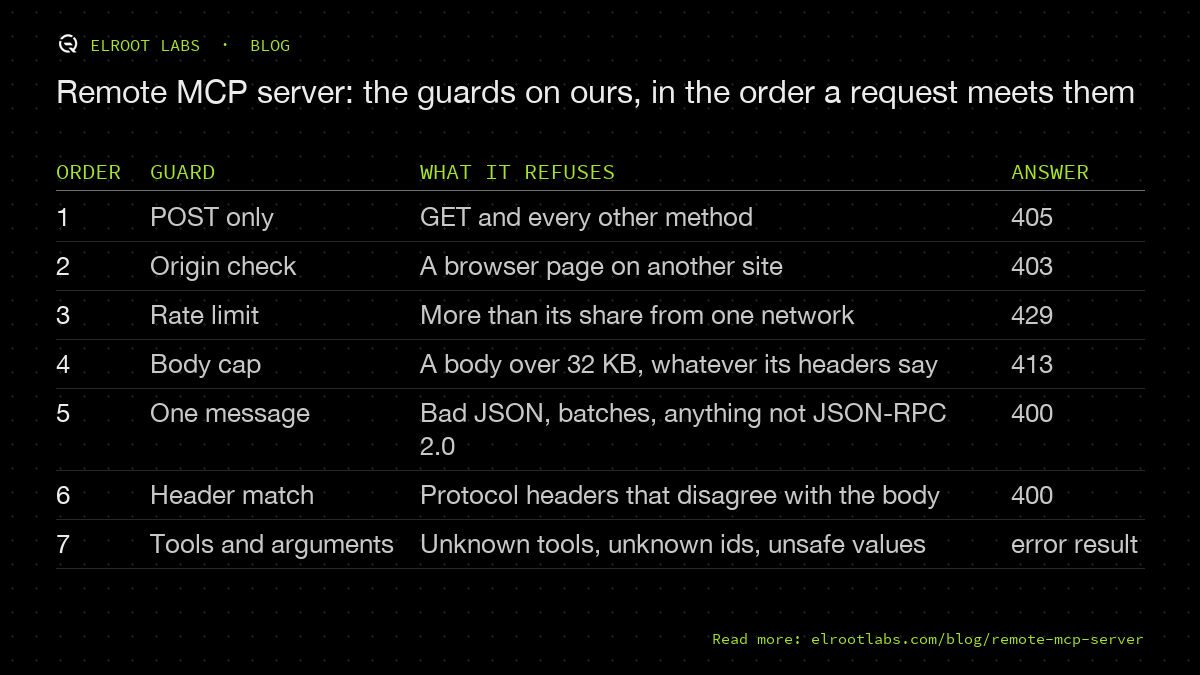
The order matters for cost. The cheap refusals come first, so a request that will be refused never gets its body read or parsed. All 22 tests for the server live next to its code, and each section below names the test behind the guard.
Refuse browsers from other sites
The specification is blunt here: "Servers MUST validate the Origin header on all incoming connections." It gives the reason in the transport section: without the check, a web page can use DNS rebinding to reach a server the visitor's browser can see. A present Origin that does not match must get HTTP 403.
Ours compares the host in the Origin header with the endpoint's own host. A request from a page on elrootlabs.com passes, and a request whose Origin names another site (the test uses evil.example) gets 403 with a JSON-RPC error and no id. Requests with no Origin header pass, because command-line tools and AI clients do not send one, and the OWASP cheat sheet warns against rejecting non-browser clients only for omitting it. We checked the live endpoint on 19 November: a cross-origin POST still answers 403.
Read the body yourself, and stop at 32 KB
A Content-Length header is a claim. Our server refuses any request that declares more than 32,768 bytes, and then reads the body itself, stopping the moment it passes 32,768 bytes, whatever the header said.
The test offers a 1 MB body in 8 KB pieces while the header claims 10 bytes. The server answers 413 after pulling fewer than 64,000 bytes. Without the second check, a caller could lie in the header and make the server buffer as much as it liked.
The next refusal is cheap too. The body must be one JSON-RPC 2.0 message: bad JSON gets 400 with code -32700, and a JSON array (a batch) or anything else gets 400 with -32600. One request, one message keeps every request's cost predictable.
Make the headers agree with the body
Clients on the newest protocol version our server speaks, 2026-07-28, send the version, the method and the tool name twice: once in the body and once in the MCP-Protocol-Version, Mcp-Method and Mcp-Name headers. If they disagree, our server refuses with 400 and code -32020. Anything that routes or logs by header, such as a proxy or a firewall rule, then sees the same request the server runs. An unsupported version gets 400 with code -32022 and the list of versions the server does speak, so a client can retry with one of them.
Clients that still open with the older initialize handshake (protocol versions 2025-11-25, 2025-06-18, 2025-03-26 and 2024-11-05) get the same tools without the new headers. Supporting both cost one extra branch in the handler, and it keeps clients working that have not moved to the new version yet.
Treat every argument as untrusted
OWASP's rule is to validate all inputs to MCP server tools as untrusted. A model writes the arguments, and a model can be steered by whatever it read last, which is the prompt injection problem in another place. These are the checks on ours, each with its test:
- Text is cut short before any work: a search query at 100 characters, a design link at 500, and any id echoed back in an error at 60.
- A colour must be a hex value. The test sends
javascript:alert(1)and checks it never reaches the generated code. - Numbers are clamped. The test asks for a dot spacing of 1e9 and gets 20.
- Text placed into generated HTML is escaped. The test sends a closing script tag followed by an image tag with an
onerrorhandler, and checks the answer contains exactly one closing script tag: the real one. - SVG answers are held at the default dot density or coarser, so an answer stays under 40,000 characters, small enough to sit in an assistant's context window.
- An unknown art id, including the test's
../../etc/passwd, comes back as a tool result markedisError. The model can read it and correct itself. An unknown tool name is a protocol error, code -32602.
Rate limiting: the binding we added did not hold
This is the part we got wrong first. Cloudflare Workers has a rate-limiting binding, and we set ours to 60 requests a minute per network. On 18 November we sent 450 calls to the staging endpoint in about two minutes from one machine. None was refused.
Cloudflare's page for the binding explains why: limits are local to the location the Worker runs in, counts are eventually consistent, and the result is an approximate limit. Requests can pass the configured limit before the counts catch up. That suits slowing down a busy caller. It does not suit a hard cap.
The strict cap is now a Cloudflare rate-limiting rule on the zone, outside the Worker. It matches the path /mcp, counts per IP address, allows 30 requests in 10 seconds and then blocks for 10 seconds. On the live site, a burst of 60 calls got 33 answers and 27 refusals. The home page kept answering during the burst, and /mcp answered again 25 seconds later.
Inside the Worker, two counters stay as a second line. Each network gets 60 requests a minute and each Worker instance 600, held in memory only. A whole IPv6 /64 counts as one caller, because one IPv6 connection can be given a whole /64 and change addresses inside it. A caller who is refused does not use up the instance's ceiling: the test sends 700 calls from one address, then checks that a different address still gets through.
What our public MCP server stores: nothing
The server reads each request, answers it and forgets it. The only thing it keeps is the count of requests per network for one minute, in memory, to stop floods. Our privacy policy says so in a section of its own, because a visitor's AI tool sends us requests and they should know what happens to them.
This also shrinks what a breach could expose. A server with no data store has nothing to leak, and one with no secrets has nothing to steal.
A checklist for your own remote MCP server
- Decide on authentication first. Skip it only if every tool is read-only, the data is public, the server holds no secrets and paid content is withheld on the server.
- Accept POST only, unless you serve a stream.
- Refuse a present Origin header that does not match your host, with 403. Let requests with no Origin through.
- Cap the body as you read it. A size header on its own is a claim.
- Accept one JSON-RPC message per request.
- Refuse requests whose protocol headers disagree with the body, and name your supported versions when you refuse one.
- Validate every argument: cut lengths, clamp numbers, allow-list formats, escape anything you put into HTML.
- Return unknown ids as tool errors the model can read.
- Put the hard rate limit outside your code, at the edge, and test it with a real burst. Keep per-network counters inside as a second line.
- Store nothing you do not need, and say so in your privacy policy.
- Write a test for every refusal, and prove each test fails without its guard.
If you want a second pair of eyes on an MCP server or another AI integration before it goes public, that is part of our AI engineering services.